Budget Allocation overview
Budget Allocation is the portfolio-level lever in Catchbase. You group a set of campaigns under one total daily budget, and a reinforcement-learning allocator proposes how to split that budget across them based on each campaign's recent performance. Active allocations are re-run weekly so the split keeps up with changing performance without a manual pass.
Budget Allocation decides how much each campaign can spend. The bidding model decides what each keyword inside a campaign bids. The two work at different levels and do not conflict.
Before you start
- At least two campaigns already imported from Apple Ads. A single campaign does not need an allocation.
- A few weeks of recent performance data per campaign. Very new campaigns produce less useful recommendations.
- The Admin role.
Create and run an allocation
- Open Budget Allocation and click Create budget automation.
- Pick the campaigns to include and set the total daily budget.
- Click Allocate with AI. The allocator returns a recommended percentage for each campaign. Percentages sum to 100.
- Review the result. Move a slider on any row to override a share; the other shares rebalance so the total still sums to 100.
- Activate the allocation. Catchbase writes the per-campaign budgets back to Apple Ads on the next sync.
Once active, the weekly scheduler re-runs the allocator against the same campaigns and updates the percentages automatically. Open the allocation at any time to see the current split.
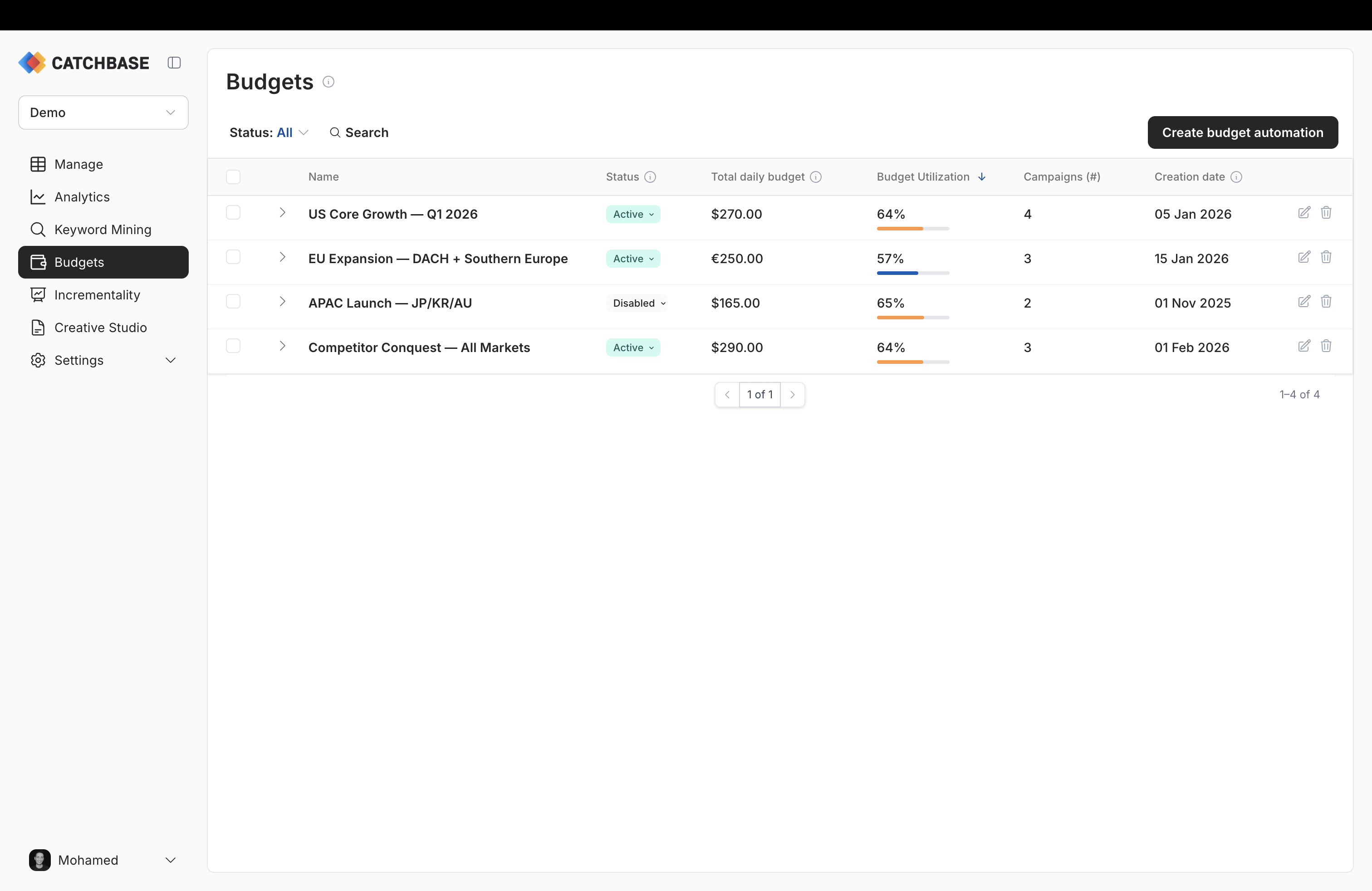
Reading the spend bar
Each row carries a Budget Utilization bar showing spend over the last 7 days divided by the combined daily budget over that same window. Green below 60%, orange 60–95%, red above 95%. Red is not an error — it usually means the campaigns in the allocation are pacing to spend their full share.
Accepting, editing, or overriding the recommendation
Three common patterns:
- Accept when the split looks reasonable and your recent performance data is stable.
- Edit a few shares when you have context the allocator does not — a campaign about to change creative, a new campaign that should ramp faster, or a share that jumped for no obvious reason.
- Override entirely when you are implementing a strategic decision the allocator cannot reflect (a fixed split from finance, a deliberate push into a specific market, a baseline for a brand-new group).
The weekly re-run will overwrite intra-week edits on active allocations. To lock in an edit, deactivate the allocation before the next run.
When to use it
Budget Allocation is useful when you operate a portfolio of campaigns whose performance varies and you want the stronger campaigns to take a larger share over time, or when you have a fixed daily envelope across a set of campaigns and want a defensible way to divide it up.
It is less useful when each campaign has a meaningfully different strategic purpose that cannot be compared on the same performance signals, or when you have fewer than a few weeks of data on every campaign in the group.
Related
- Editing and activating allocations
- What is the bidding model
- Deep dive: RL bidding article — the keyword-level parallel.