Discovery automations
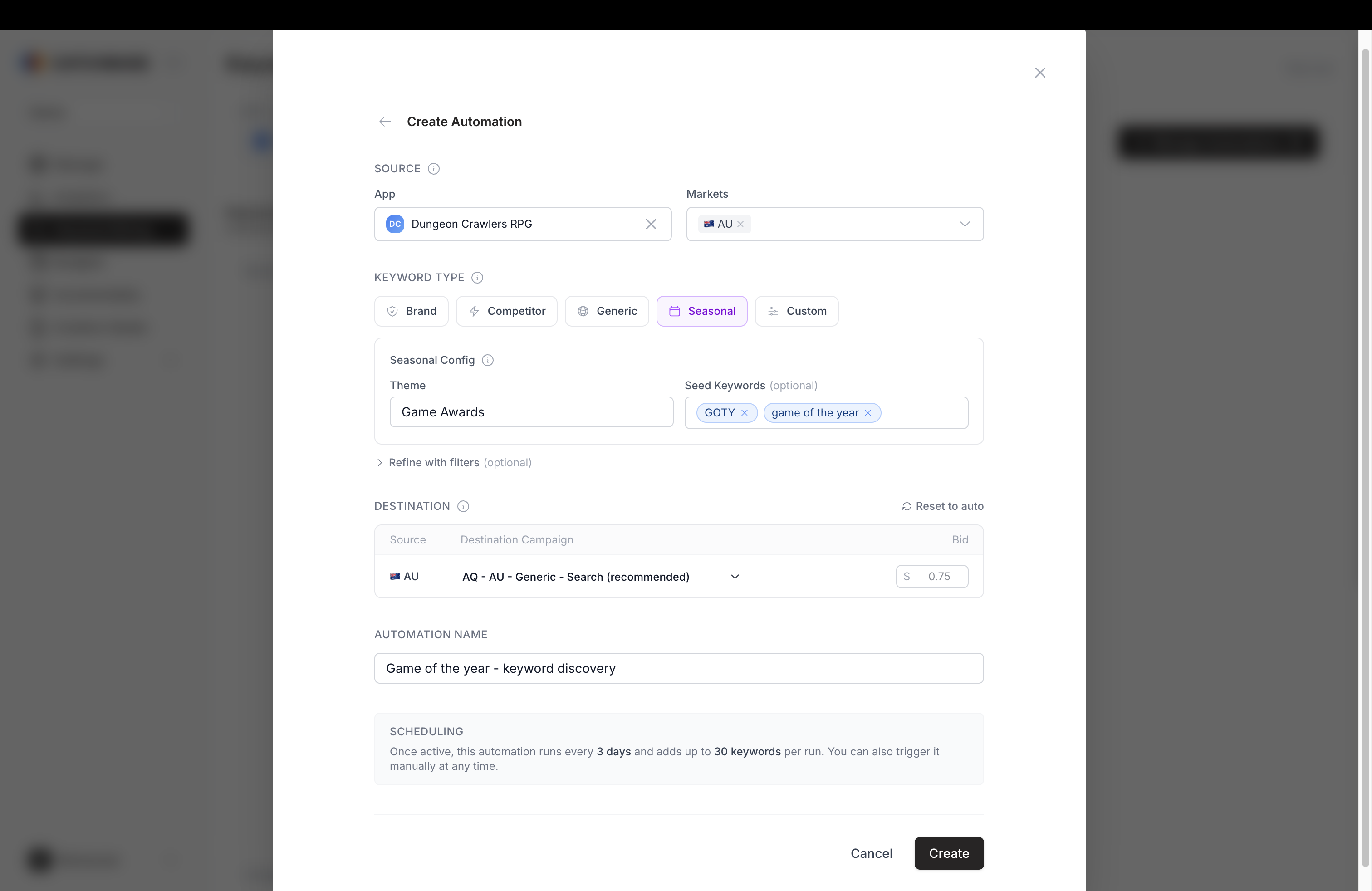
A discovery automation routes discovered keywords from the mining output to your Apple Ads campaigns. You configure one automation per app and preset type (brand, competitor, generic, seasonal), tell it which markets to source keywords from, and it pushes matching keywords into the right campaign each time it runs. Use automations when you want new keywords to reach your campaigns without copying them in by hand.
Before you start
- Apple Ads integration connected for the app you want to automate.
- Campaigns already set up for the app in each market the automation will cover.
- The Admin or Editor role, depending on the action.
What an automation contains
Scope. The app and the set of source markets. A single automation can source keywords from several markets at once, for example US, GB, and DE.
Preset type. One of brand, competitor, generic, seasonal, or custom. The preset tells the automation which keyword category to look for in the mining output, and sets sensible filter defaults for that category. Custom gives you a blank slate: no defaults, no category assumption; the filters you configure are the whole definition.
Filters. Optional additional filters that narrow which discovered keywords are eligible. Filters can act on the keyword text (contains, equals, starts with, ends with), the relevancy and popularity scores, the trend percentage, and the keyword type (short tail, long tail). For competitor-preset automations, filters can also act on the competitor name, developer, category, relevancy, popularity, the discovery keyword the competitor surfaced against, and the competitor's organic rank.
Action. The match type (exact or broad), the default bid amount and currency, an optional cap on keywords added per run (useful for staged rollouts), and the campaign routing.
Seasonal configuration. For seasonal automations, a theme block: a theme name (for example, "Black Friday 2026"), optional seed keywords, and LLM-generated keywords that expand the seeds into a working set. The generated keywords appear after you save the theme and can be reviewed before the automation runs. The theme's generation timestamp is shown on the automation row.
One keyword per campaign per market
The automation enforces a single rule that keeps your own campaigns from competing against each other: each keyword goes to exactly one campaign per market. When more than one candidate campaign qualifies for the same market (for example, two generic campaigns in the US), the routing mode you pick decides which campaign receives the keyword.
Two routing modes are available:
- Auto resolve. Catchbase picks the best campaign per market based on historical campaign context. No per-market configuration required.
- Manual. You pin specific campaigns to specific markets. New keywords for a given market go to the campaign you pinned for it.
Pick Auto resolve when you trust Catchbase to choose. Pick Manual when a specific campaign should own a market — for example, when a priority brand campaign should receive every brand-type keyword in the US.
Activating, pausing, and running
-
Open the rules panel on the Keyword Mining page to see the list of automations for your organization.
-
To activate an automation, set its status to active. To pause it, deactivate it. Deactivating leaves the configuration in place; it only stops the next scheduled run.
-
To run an automation on demand, use the execute action on its row. The run can be a dry run, which shows what keywords would be added without writing to Apple Ads, or a live run, which pushes matching keywords through. Dry runs are the safe way to preview a new automation before switching it on.
-
After a run, the list shows the last execution timestamp and a summary. Open the row to see the per-market breakdown, a distinction between dry-run and live-run history, the keywords added (or would-be-added, for dry runs), and any warnings or errors the resolver surfaced.
What happens after a run
Keywords added by an automation appear in the target campaign's keyword list in Apple Ads and in Targeting keywords in Catchbase. The bidding model then takes over bid management for them inside each campaign's objective and target.