Campaigns overview
Campaigns are the unit of work in Apple Ads. Every tap, install, and dollar of spend belongs to one. This page covers how Catchbase represents a campaign, the hierarchy around it, and the fields you will interact with on the campaigns list and campaign detail pages.
The object hierarchy
Catchbase mirrors the Apple Ads model. Four objects sit in a fixed hierarchy.
- Campaign group: one Apple Ads organization. A Catchbase organization can contain several campaign groups if your Apple Ads account has more than one org.
- Campaign: lives inside a campaign group. Holds the daily budget, the objective, and the target.
- Ad group: lives inside a campaign. Holds the default max cost-per-tap (CPT) bid and any audience targeting set in Apple Ads.
- Keyword: lives inside an ad group. Carries the match type (Broad or Exact) and an optional per-keyword bid.
Negative keywords attach at campaign or ad-group level and are managed in Apple Ads.
What a campaign carries in Catchbase
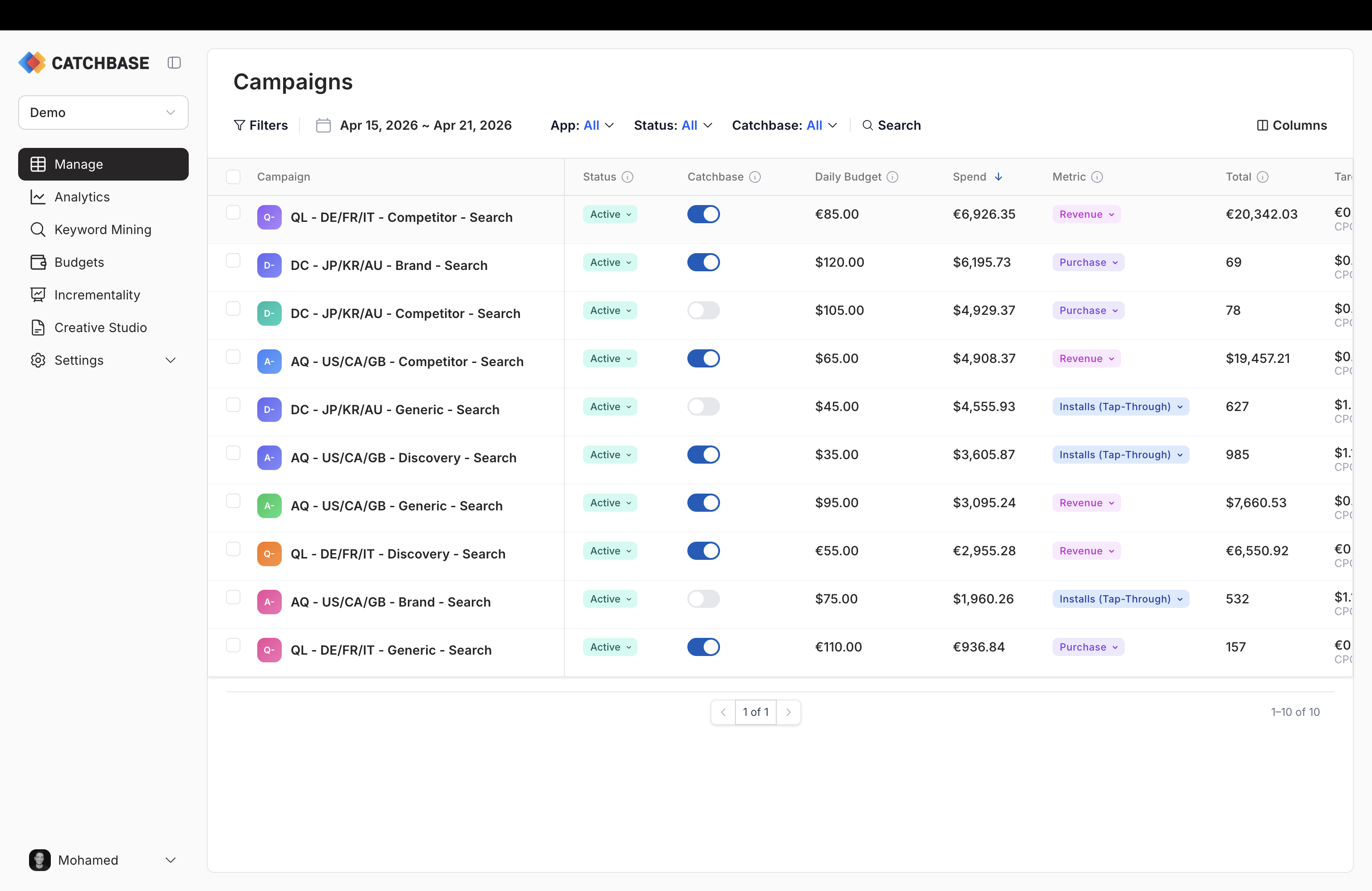
The campaign list (dashboard home) and the campaign detail page surface the fields below. Most come straight from Apple Ads. The bidding model-specific fields live only in Catchbase.
- Name and status (Active, Paused, or On Hold). These reflect the Apple Ads state. Pausing a campaign in Catchbase pauses it in Apple Ads.
- Daily budget. The per-day cap Apple Ads will not exceed, in the campaign's native currency.
- Countries or regions. Set in Apple Ads at creation time.
- Serving status. Why a campaign is or is not currently serving, when Apple has held it.
- Catchbase status (Active or Inactive). Whether the bidding model is managing bids for this campaign. A campaign can be Active in Apple Ads but Inactive in Catchbase, which means Catchbase is reporting on it but not bidding.
- Objective type (Volume or Revenue). Drives whether the target is read as a cost goal or a return goal.
- Objective metric. What the bidding model counts: installs, lifetime revenue, a cohorted revenue window (D0, D1, D7, D14, or D30), or a custom MMP event. See Campaign settings for the full picker.
- Target. Cost-per-install or cost-per-acquisition for volume objectives; target ROAS for revenue objectives.
- Recommended target. A Catchbase-suggested value computed from recent performance.
- Category. Catchbase labels each campaign (Competitor, Brand, Feature, Generic, Discovery, Other) by matching words in the campaign name. It is a convenience tag that you can filter by on the campaigns list; it is not an Apple Ads field and has no effect on bidding.
When a campaign is on hold
Apple can put a campaign into an On Hold state rather than Active or Paused. The row shows the On Hold badge with a numbered circle next to it; hover over the circle to see the list of specific hold reasons Apple returned. Common reasons include missing attribution data, a problematic ad creative, or a policy review. Address each reason in Apple Ads (or in the upstream integration) and Apple will release the hold on its next review.
The campaign's Catchbase status is independent of the hold state. A held campaign can remain Active in Catchbase; Catchbase will just have no opportunity to bid on it until Apple resumes serving.
Inline editing
The campaign name, daily budget, and target are all editable in place on the campaigns list. Click the cell, type, confirm. Name and daily budget save back to Apple Ads; the target is a Catchbase-side setting and saves locally. Press Escape to cancel an edit mid-way. For bulk edits across several rows, select them with the row checkboxes and use the bulk action bar at the bottom of the screen.
Which fields are Apple's vs. Catchbase's
The name, status, daily budget, and countries are Apple's. Creating or deleting a campaign, changing its name or countries, or moving the daily budget writes through to Apple Ads. The Catchbase status, the objective type, the objective metric, the target, and the recommended target live only in Catchbase and are what the bidding model reads when it bids.